Showing posts with label SEO. Show all posts

Teach Google-search about your blog with the Data Validator

/ Saturday, December 22, 2012 /
This quick-tip is about the Webmaster Tools Tool Data Validator tool - which is an easier way to "teach" Google about the way things are described on your blog or website.


quick-tips logo
Recently, Google announced a new feature in Webmaster Tools called the Data Validator.

This is like a simpler way for website-owners (which is what bloggers really are) to tell Blogger about structured information that they put onto their sites - by point-and-clicking at the information on screen, rather than by learning the intricacies of Rich Snippets and the snippet testing tool.

What they've released so far is just an English-language tool for events - "such as concerts, sporting events, exhibitions, shows, and festivals".

To use it you need to
visit Webmaster Tools, select your site, click the "Optimization" link in the left sidebar, and click "Data Highlighter".

And obviously you need to have verified the blog in Webmaster Tools before you start, and to do the "learning" with the same account.   NB   Some blogs will be automatically verified, but some won't:  if yours isn't, then the best way to do this is to choose Alternate Methods and choose HTML Tag - then add the meta-tag to your blog.

The bottom line is that for this to work, you need to put the information into your blog the same way every time (aka in a "consistent format"). What will be interesting to see is exactly how "consistent" it needs to be - I suspect that the tool will probably get smarter over time.

I haven't had a chance to try it yest,  /But I am using a Blogger to manage the website for a small choir which has a concert in January.   So I think I'll start by structuring the announcement of the last concert in June 2012, and then see how well it applies the learning to the next one.

Stop spammy links from hurting your blog

/ Wednesday, October 17, 2012 /
This article describes the Disavow tool, which you can use to ask Google to stop taking notice of links to your website that you consider to be bad.


Google's Webmaster tools now include a way of telling Google to ignore certain links when it is deciding what reputation your website or blog should have.

This can be important if SEO is important to you, ie if your blog relies on Search to get visitors, because your "reputation" helps Google to decide where to list your site in the search results. And there is plenty of evidence that the higher your listing, the more "clicks" you will get.

Sometimes you can get links to your blog removed by simply by asking the person who made the link in the first place. Maybe they made a mistake, maybe they've reconsidered their own linking strategy, etc.   To ask them, you need to find them.  Options for this include:
  • Looking at their website to find contact details
  • Finding them on Google+ or via their Blogger profile
  • Tracing them on other tools like Facebook or LinkedIn. 

Worst case, your only option may be to leave a comment on their blog, and hope they're still looking at new comments.

But often enough, you won't be able to get "bad" links removed: the person who made them can't be contacted, or won't co-operate. Worst case, they may be a competitor who is trying to make Google think that your site is "bad" by doing "negative SEO", ie creating lots of spam-links to it.


Telling Google about bad links


The Disavow tool is WebMasterTools new approach to dealing with problems like this.

It lets you tell Google that you think they should ignore certain links. To do this, make a text file (using NotePad, etc).    The file should have
  • One line for each link that you want to fix.
  • The phrase "domain:" at the start of lines listing websites that you don't want any links from
  • A hash (# - AKA a pound-sign in the USA) at the start of any lines containing comments (eg your own notes about what's happened) that you want the Disavow tool to ignore.

An example file might look like:
# Left comment on SammySpammy's blog on 4/5/2012. Asked him to
# remove links, but he said "No"

# Fred from BuildYourBlogNetwork.com removed most links, but missed these
http://www.BuildYourBlogNetwork.com/firstPageTheyMissed.html
http://www.BuildYourBlogNetwork.com/another-page-they-missed.html
http://www.BuildYourBlogNetwork.com/and_Another.html

Once you have made your file, go to the Webmaster Tools Disavow page, choose the correct blog from the list (if you have several), and then upload the file.


Note: you need to be verified in WebMaster tools as the owner of your bog to access it on that page.   Blogger-administrators are "supposed" to be automatically verified, but sometimes this has not happened - if this has happened to you, then your blog won't be in the drop-down list. If necessary, you may need to manually verify your ownership by adding a meta-tag to your blog. LINK (Webmaster tools will give you the tag to add.)

Also, notice the warning that they give:

This is an advanced feature and should only be used with caution. If used incorrectly, this feature can potentially harm your site's performance in Google's search results. We recommend that you only disavow backlinks if you believe you have a considerable number of spammy, artificial, or low-quality links pointing to your site, and if you are confident that the links are causing issues for you.

What they are saying is that if you ask them not to take notice of a link which isn't bad, they might well do so - and this could have quite a bad affect on your search results.   In short, if you are going to disclaim all knowledge and validity of a link, be absolutely certain that this is the right thing to do.


What does the Disavow-links action do?  And how fast does it happen?


Effectively, the disavow file lets you suggest that Google should ignore the links you have listed. If Google accepts your suggestions (there are no promises), they will be applied the next time that Google re-indexes the site(s) that you have suggested.

This can take weeks to happen - because if they really are spammy sites, then Google probably isn't that keen on them anyway! So you won't see an immediate effect. But over time, they should improve your standing in Google's eyes if the links really were causing a problem.

The FAQs in Google's announcement of this tool say that it's really aimed at people who know they have done silly things in their own link-building, and who want to fix the problems they have caused - and which Google have told them about. Specifically, they say "If you haven’t gotten [notification of a manual spam action based on “unnatural links” pointing to your site], this tool generally isn’t something you need to worry about".

But my guess is that this approach will be interesting to many blog owners who do worry about inwards links that they aren't happy to be associated with anyway. It won't remove the links from the internet totally (only the other site owner can do that), but it will stop Google from penalizing you because of them when it decides how to show search results.


What your readers see

Visitors to your blog see absolutely nothing different - using this tool has no immediate effect on your layout or content.

But if your suggestions have an impact on how Google ranks your site, they will hopefully see your site at an earlier position in their search-results pages in future.


Related Articles:


5 reasons why SEO doesn't matter for your blog

Adding a meta-tag to your blog

Taking action when someone has used your copyright material without permission

Desktop search turns a downward corner?

/ Tuesday, September 18, 2012 /
This Quick-Tip shares an interesting observation about the trends in search-volumes - and is a reminder to think about what your blog is like for readers who use mobile devices.


Today I noticed an interesting post from on-line marketing firm Blind Five Year Old, who've been tracking comScore search-engine ratings for seven years.

comScore's ratings are all about relative market share of the search-engines.

But BFYO has used them to look at overall search engine volumes and has noticed that
August 2012 was the first time that US desktop search volume declined year-on-year

This means that there were less desktop searches (in the USA) in August 12 than there were in August 11. Year-on-year comparisons are often better than monthly ones because they can cancel out the effects of seasonal patterns (holidays, starting school, major events, etc)

Now this doesn't mean that people have stopped doing more searching than before. Most likely it means that they've started to do more of their searching on mobile devices (tablets, smartphones, etc).

For Blogger users, it means that:
If your blog depends on search to get readers (or even just new readers)
   and
Your blog topic is one that people will search for using a mobile device
   then
You need to think about how how your blog looks and works on mobile devices, and most probably to enable a mobile-template for it.

This doesn't apply to everyone. For example, Blogger is primarily desktop software, so I'm not really worried about the mobile experience given by Blogger-Hints-and-Tips.   But my public-transport blog now gets about 25% of its visitors from mobile devices - and I think this will grow. So it matters there.

Even if you don't think that your blog would have "mobile-appeal" or appear in local search results - don't forget that many people now like to catch up on reading using their smartphone in in-between moments.  If your blog is "a good read" rather than desktop-specific reference information, then being mobile-friendly might be the difference between whether people subscribe to you or not.

Mobile templates, by the way, are fantastic because they let Blogger-users deliver sites that are responsive with far less effort than owners of conventional websites are having to put in.

Verify your Google + page to get more exposure in search results

/ Friday, September 7, 2012 /
I spotted an interesting post in the AdSense blog just now.

It's actually been deleted from the blog (probably because it was supposed to be posted on the Google+ blog, not the AdSense one), but the original feed content is still available, for now, at http://feedproxy.google.com/~r/blogspot/tuAm/~3/30qIWIcbTMk/social-fridays-gain-visibility-by.html

According to the feed, it's all about verifying Google + pages, ie making an official link between a page and a website.   They say

Verifying your +page confirms that the +page actually belongs to you. Once your +page is verified, it’ll appear with a checkmark designed to help our users find what they’re looking for.
and

Verified +pages that are popular and engaging may appear on the right side of relevant Google.com search results, for users who are logged in. .... Please keep in mind that to be eligible, the +page also needs to be active with regularly-updated content

To verify your page, you need to
  1. Link your +page to your website: Fill out the ‘About’ section of your Google+ page, being sure to enter your site’s top-level URL.
  2. Link your website to your +page: Add a Google+ badge or code snippet to your site, ...
  3. Complete ... [the]  verification request form.
  4. ... continue posting regularly to your +page ....

The verification form, at http://support.google.com/plus/bin/request.py?hl=en&contact_type=page_verification&rd=1 states the conditions a little differently (boldness mine);
  • Your Google+ page must be authorized by your commercial entity, organization, brand, or product.
  • Your Google+ page’s profile must contain a link to your organization’s website.
  • Your organization’s website must connect to your Google+ page, by adding the Google+ badge or by adding a snippet of code.
  • A meaningful number of people must have added your Google+ page to their circles.


This will be simple enough for most of my sites - I own the website and the G+ page.   Though it should be a little more challenging for one or two community groups that I do things for, where the ownership is a little ore "vague".

My only decision is whether to start the verification process now, or to wait for this to be announced on the right blog!

Blogger and valid HTML code

/ Tuesday, August 14, 2012 /
This article explains the issues faced by Blogger users who try to see if the HTML in their blog is valid - and why this doesn't matter in most cases.


What is "valid" HTML

If you read SEO advice or webmaster guidelines or web-best-practises, you should be told to make sure that the HTML in your website is valid.

Valid HTML is simply website code that totally meets the rules defined by W3C, the non-profit organisation that ultimately makes the rules about HTML and the other scripting languages that are used on the internet.

You can tell if the code on a site is valid by using a validator tool, like http://validator.w3.org/   - this is the best one, since it's from W3C:  if anyone knows whether something follows the rules, then they do.

But really, what is valid HTML/XHTML, and why does it matter?   Basically, it's code that meets all the rules and standards that have been decided for the current version of HTML, as at today.   It matters because web-browsers are written so that they correctly show information on screen if the code that is used to describe it follows the HTML rules.

However, as personal devices/computers and the web gets more sophisticated, the rules are enhanced so that browsers can do  more interesting things.   This means that code that was valid several years ago may not be valid today, because the rules have changed.


How to make the code in your blog valid

The short answer is that there is no way to force Blogger to generate valid code.

The slightly longer answer is that Blogger software makes your blog's posts and pages into web-site pages by combining:

You can control whether the code on your posts is "valid" - but only as far as Blogger's Post-editor lets you (eg it takes out <p> </p> tags and uses <br /> instead - this isn't regarded "good practise").

And you can edit your template to remove certain things that are not valid.

But no matter what you do, you can not remove all the "invalid" code that's generated by Blogger when your posts or pages are published, and you don't have the freedom to "clean" their code either:  Blogger provides us with free hosting and unlimited bandwidth - the price of this is that they impost some limits on what we can do with them.

So your overall site will not be valid accordingto the W3C rules.  There is nothing that you can do about this - and personally I don't think this will change any-time soon.


Is invalid HTML code really a problem:

At first glance, this may seem like a disaster - if Blogger won't make "valid" code, then we cannot use it to make blogs/sites that display properly, or that meet Google's own webmaster guidelines.

That's not quite right, though:  an important feature of the way browser-software and the internet work  is that browsers try to to work out what to do with HTML code that they don't understand (eg code that isn't valid any more, or code that's got new features that the brower doesn't support yet).  Instead of crashing, they make a best-guess about what to show on the screen, even though this might take them (a little) longer than showing valid code.

What that means for us Blogger-users is that our sites will be just fine most brower-software..

What's more, Google have promised that the  HTML which Blogger produces will work on the  most recent and last-most-recent version of the currently popular web-browsers - even though it's not "valid".

The only consequence is that our blogs may take a little longer to load, while the browser decided what to do with the "invalid" code - but in most cases, this extra time will be small compared to the time needed to load our pictures and gadgets, not to mention other cool things like Twitter messages or Facebook like buttons.

Of course, if you're a purist and hate "breaking the rules", then having an "invalid" blog may be more of a problem than you can bear.  But if you're realistic, you will notice that there are many, many fine sites made with Blogger, and this lack of valid HTML doesn't appear to be doing them much damage.


SEO and code-validity

In the early days of search-engine-optimization, people thought that having valid code would make it easier for Google and other search engines to look at and index your website - and this would make it do better in search results.

Initially, they may have been right.  But Google et al are pretty motivated to index everything - especially the blogs that their tools create.   And today, web-search "spiders" have become pretty clever about understanding web pages, no matter whether they're valid or not (or were valid before, or will be valid in future, etc)

In short, if you've been reading up about SEO and found a recommendation to "make sure your website code is valid", then I'd suggest skipping that advice, and spending your time worrying about more important things, eg that:

(*)  technically, the phrase is "key words" - and there are zillions of guidelines telling you how to choose "good" key words for your niche.   But  the simplest approach is to use version is "interesting" words, that people who are looking for your blog post are likely to use.


Related Articles:


Does search-engine-optimization matter for your blog.

Copyright, blogs and bloggers

Showing a picture on your blog

Understanding Blogger's Add-a-Gadget tool

Showing a working Twitter message in Blogger

Adding Facebook like, Send and Share buttons.

5 Reasons why SEO is irrelevant for your blog

/ Thursday, August 2, 2012 /
This article explains what search engine optimization (SEO)) is and why it is sometimes not relevant for  bloggers, ie why many of us should ignore all the "essentials SEO for your blog" advice and focus on writing good-quality original posts.


It also has a simple guideline for deciding if a particular piece of SEO-advice is relevant for your blog.


What is "SEO" anyway?

Very simply, SEO is a bunch of things that you can do that make it more likely that your site will be high in the results-list and then clicked-on when someone searches for "topics like yours" on Google, Bing-etc.

There zillions of websites / books / blogs etc with the latest "amazing SEO strategies" that you "absolutely" need to implement on your blog.

But very few of them stop to ask whether SEO is relevant or not, meaning that lots of people waste time doing "enhancements" that really aren't relevant for their blog and audience.

Read on to find out whether you need to take any SEO-notice or not.


Why SEO doesn't matter for lots of bloggers


1 Your blog is just for you

Do you keep a blog to record your thoughts, photos, journeys?

If it's private, so only you can read it, then SEO is totally irrelevant for you, because search-engines cannot see your blog, much less point anyone else to it.


2 Restricted readership

This is very similar to point 1:  If your blog is for your friends and family, who you have personally invited, and if you have stopped all other readers (or so you think), then Google is never going to list it. And you don't even want search engines to know it exists. SEO isn't something you need to think about.


3 You get your customers through other methods

You might be sceptical, but let me explain with a story.  When I started Blogger-HAT, I wasn't looking for readers. I just wanted a place to keep my own notes about how I'd fixed problems with Blogger, so that I could find the information again if I needed.  (My very first post was about how to put AdSense ads right inside posts - and it's still popular today.)

Then I noticed that in the old Blogger-help-foroum, people with a reputation for helping others were more likely to get help themselves. (Karma or whatever). Answering a few questions each day seemed like a good insurance policy against the day that I got stuck.  But it was tedious typing the same answer over and over, so I started making articles about common topics, and linking to them instead.

At this stage, SEO still didn't matter: I was writing for me, and then I was writing for people who I'd identified outside of the blog, and not fussed about advertising revenue.  So it didn't matter that I wasn't doing key-word research or density analysis, or even write compelling headlines or labelling pictures.  I just wrote up the solutions to problems for the people who came to my blog from the help-forum. And this was fine because I wasn't aiming for more readers, or advertising revenue.

Of course times change:  the move to the groups-based Blogger-Product-Forum has seen a lot more people searching for answers instead of asking in the forum, and I've become more aware of the benefits of owning a blog with a higher page-rank.  So these days I do worry about SEO a little, because it's now relevant to me, now.

4  Your blog is for a business with a local customer base business

Moro Cafe Sign (Sherman County, Oregon scenic images) (sheDB0203)If you're a hairdresser or cafe-owner, and your business makes money by cutting hair or sellng coffee, then on-line visitors from all over the world aren't going to contribute directly to your bottom line. And if pay for file-hosting, they may cost you and give no return.

What you need are warm bodies walking through your door, and telling their local friends good things about you.   But unless there are no other cafes or hairdressers in your area, there's almost no chances that you can get a high place in the search-results for "cafes in mytown" because the directory sites and local media (who have lots more time, energy, SEO skill - and access to a wider range of business information) will beat you every time.

That's not to say you shouldn't have a website to share information about your business, and on-line tools to get customers - but focus on social networks like Facebook fans, directory listings, Twitter conversations, Pinterest-displays, forum-posting, etc instead wasting time on an "seo-quest" that you're bound to lose.


4 It's a tool for delivering an on-line newsletter

Some people use a blog purely so they can use the follow-by-email gadget as a very simple newsletter subscription management tool. It's not the best tool out. But it is free, and it means that your previous newsletters stay on-line in case people ever need to refer to them.

Unless you want newsletter subscribers to find you by search, instead of by off-line relationships, then SEO doesn't matter for you, either.


5  You just don't want "customers" or visitors.

Or maybe you just hate the thought of being famous or mainstream!    Or whatever other reasons you have for not wanting too many people to find your blog by searching for it.


What if none of this applies?


If these points don't apply to your blog, then probably you do care about attracting visitors from search-engines,

So you should spend some time thinking about things you can do on your blog to make it more likely that search-engines will:
  • List your your pages in the search results shown to people who are in your target audience, and
  • Do it in a way that makes it more-likely that these people will click through to your blog.

Unfortunately there are no simple answer to what you should actually do.   It all depends on your blog, how your template works, what sort of people are in your audience and what they do on-line.  So really, you need to read all the advice and weigh up:
  1. How much time/effort it would make to do what they suggest
  2. Whether the suggestions "fit" with the audience and purpose of your blog
  3. Your instincts about what changes are most likely to help your current and future readers find you more easily

You need to keep coming back to this point every time your read another expert's advice:   does this suggest helpe me achieve what I want to achieve, given what I know about them.    If any possible change doesn't get a "yes" answer, then it's a good think not to do.

Also remember that you don't have to do everything all at once:  SEO is a like delicate game of cat-and-mouse that's been going on since the internet was invented.   The only rule is that the rules changes very often.   So you will never be "finished", and a  website will never by "totally SEO'd"


That said, I am interested in hearing what changes you've made for "SEO" reasons, and how well they have worked for you.


Related Articles:


Restricting blog-readership isn't as secure as you think

Advertising and blogger, some things to consider

Follow-by-email:   turn your blog into a subscription management system

Picasa - a very basic introduction

Linking Blogger and the social networks

Have all your posts been added to Google search results yet?

/ Friday, July 27, 2012 /
How can you tell if Google has indexed your blog - or if it's indexed all your posts.

The quick way is to search for site:YOUR-BLOG-NAME and see how many results are returned.   If it's roughly the same as your number of published posts, then you're about right.   But what if it's not?

For example, if I google
site:blogger-hints-and-tips.blogspot.com
I get
About 385 results (0.26 seconds)


However I've only 226 published posts in blogger-hints-and-tips.   That tells me there's a problem with content being indexed more than once.   Looking at the results, I can see the problem immediately:  my dynamic-views have been indexed (goodness only knows why) - but also, my archive pages appear to have been indexed.  

For a more in-depth analysis, though, Webmaster Tools now has an Index Status feature, which is particularly useful if there are less pages indexed than published posts, because it shows you if it's always been like that, or if there has been a change at some time which led to a lot of your posts being removed from Google's index.

To use it:


  • If you haven't verified the account before, you may need to do this.
    (Google have said before that blog-owners are automatically verified, but I've found a few times that this hasn't quite worked - I've had to manually verify by installing a meta-tag that they provide)


  • Look under the Health tab for Index Status. It shows a graph of the number of pages indexed vs date for (up to) the last year.


Looking at the graph, if:

  • the line is flat and you havn't made posts at that time, or
  • you have been posting and the line is going upwards,

then it probably means that all your posts are being crawled and indexed (and so can be found in google searches).  

But if there's a different pattern, the advanced tab might be helpful.   It shows:

  • the number of pages indexed
  • the cumulative number of pages crawled,
  • the number of pages that Google knows that it couldn't look at because they are blocked by robots.txt, and
  • the number of pages that were not selected for inclusion in search results.


These numbers are point-in-time totals, not numbers of additions.

Note the important difference: the first graph shows pages indexed (ie added to Google). The advanced one shows pages crawled. If Google crawls a page and finds it hasn't changed since last time they looked at it, then they don't bother indexing it again.

If some of your posts aren't in Google anymore, and the graph of pages indexed has a sudden drop, then most likely a change that you made at that time has caused a problem with indexing or includign your results.

Of course just knowing when things happened doesn't tell you why they happened.  In my case, I remember adding the Archive gadget into Blogger-HAT's layout.   Obviously I didn't stop the pages from getting indexed (though it does make me bitter and twisted that Google doesn't just handle this for us!)

What this does point out, though, is that if you're serious about managing your site for maximum searchability (SEO-friendliness), you should keep a note of the date and time of any structural changes you make, so that you can compare this with diagnostic tools and see if there's a link between the changes and changes in your visits, indexing etc.

How to remove the numbers in blogger post URL's

/ Tuesday, July 24, 2012 /
This article looks at the numbers that are in web-page addresses created by Blogger, what they mean and how you can influence them.


no symbol over digits section of blog-post website address
When you first publish a post, Blogger assigns a permanent web-address (aka an URL or a permalink) to the post.  I've previously explained how you can control the words used in this hyperlink.

And a common question from people who are researching SEO for their blog is "how do I get rid of the numbers in the post-URL?".

Unfortunately the answer is not as straighforward as most people hope for.


Numbers near the start of Blogger URLS

As described in setting the content of your post's permalink, the URL given to posts publisehd in Blogger shows the year and month of the original publication date for the post. I think this is because Blogger was originally set up as an on-line diary, with a lot of the features organised around the post-date.

numbers in the website address of a blog post, as show in Internet Explorer

Today, there are ways of giving your blog a home page, showing your posts in pages, and changing the order of the posts, which let your blog be a lot more than a date-ordered web-log.

Some blogging software (eg Wordpress) lets you choose the structure of the URLs which are used, eg leaving the date out totally, or puting it after the words.

However Blogger does not currently have any way to remove the date-part of the post URLs. And I could be wrong, but my best guess is that this will not change anytime soon.

So what options are available:


If you just don't want people to know the correct month and year of the post, then you can change the date before you publish the post for the the first time. Maybe make it something non-sensical (eg 1/1/1990). (However do remember that your RSS feed will show the actual date of publication, not the assigned date).

If you have some content where any month-and-year are particularly irrelevant, put it into a Page instead of a Post - because Page URLs don't contain a date. Remember that each blog can have no more than 20 pages, and that you need to give users a way to get to these Pages. Also remember that they are not sent out in your RSS feed, so subscribers won't see the content.

The third - and least attractive - option:  accept that this is how Blogger works and that you need to live with it or switch to another blogging tool.


Numbers near the end of Blogger URLS


Blogger puts digits at the end of post-URLs to make sure that each post ever published has a unique address.

Notice that I said "ever published": if you publish a post, then delete it, and then publish a second post with the same year, month and either title or customized-URL-words, then the second post's URL will have some digits put on the end, to stop it being the same as the first one.

Once a post is published, you cannot remove the digits. The only way to avoid them is to make sure that your post-URLs are unique. So if you publish a post and notice that it has digits on the end of the URL, your only option is to delete that post, and replace it with one which has a different publication date (don't forget to copy the post contents before you delete it!)

For example, if you publish and find that you get
www.all-about-cats.com/2012-07/vegetarian-cat-food-recipes01.html
you may want to delete the post, and republish the content in a post with a different date like
www.all-about-cats.com/2012-06/vegetarian-cat-food-recipes.html


Does it really matter?

Crystal 128 karmPersonally I'm not convinced that having numbers Blogger URL's is a problem.

If the content is so weak, and poorly linked to by other sites and social media that the presence of numbers in the URL is affecting visitor numbers, then it seems to me that there are more important things for you to be worrying about.

On the other hand, if your blog is already popular and well-optimized, and you're looking to get the last possible bit of SEO benefit - you'd be better off using your time to write even more good quanlity, unique, content so that your exisiting subscribers visit more often, instead of fussing over something that you cannot control.

Or am I mistaken?


Related Articles:


Setting the custom-URL for a blog post

Giving your blog a home page

Putting Blogger posts into pages

How to set the date for a post

The difference between Posts and Pages

What is RSS and why it matters for bloggers

Removing a post from your blog

Copy the contents between blog posts - and keep all the formatting.

How to set the URL for Blogger posts

/ Wednesday, July 18, 2012 /
This article shows how to use the Permalink options to control the URL used for a post in your blog.

URLs and Blog Posts

When you first publish a post in blogger, an URL (called a permalink in blogger) is automatically generated for that post. It looks like:
www.yourDomain/yyyy/mm/WORDS-ABOUT-MY-POST

In this URL:
  • yourDomain is either your custom domain (eg fred-fish.com) or your blogspot domain if you aren't using a custom domain at the time (eg www.blogger-hints-and-tips.blogspot.com)
  • yyyy/mm is the year and month of the post's original publication date.

Until now, Blogger chose the WORDS-ABOUT-YOUR-MY based on the title, or the first words in the post if the title was blank. They used some rules eg leaving out "the" and other common words, and putting numbers on the end so that every post has a unique URL (called a "permalink" in Blogger).

However Blogger have now provided a tool that lets you choose the WORDS-ABOUT-YOUR-POST separately from the post-title.


How to change the customisable part of the URL for a post


1  Edit the post in the usual way.

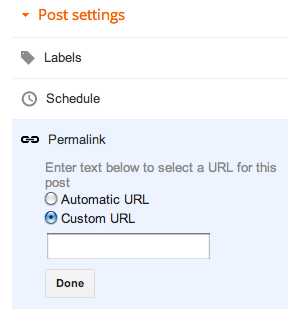
2  In the Post Settings area (currently at the right hand side of the editor), there is a section called Permalink.

3   Click on Permalink to show the options in it.

4   Click the custom URL radio button

5   Type the words that you want to use in WORDS-ABOUT-YOUR-POST into the Custom URL box

6   Click Done.

7   Finish the post, and Publish it.

Restrictions:


This is a one-time option for each post - you if you use the wrong words, or make spelling mistake, then there is no way to change it.

The only characters you can use are:
  • lowercase letters (ie a, b, c ... z)
  • uppercase letters (ie A, B, C ... Z)
  • digits (ie 0, 1, 2 ... 9)
  • underscore (ie _)
  • dash (ie - )
  • full-stop, also known as a period (ie .)
It looks like there is no restriction on the number of characters you can put into the URL.  For example, I was just able to make a post in my test blog, with this URL:  
http://bhat-draftarticlestore.blogspot.ie/2012/07/123456789-123456789-123456789-123456789-123456789-123456789-123456789-123456789-123456789-123456789-123456789-123456789-123456789-123456789-123456789-123456789-123456789-123456789-123456789-123456789-123456789-123456789-123456789-123456789-123456789-123456789-123456789-123456789-123456789-123456789-.html
(you cannot see the post, because that particular blog isn't open for public reading.)


If the combinaton of yyyy-mm from post-date (which you can change - see Setting the Post Date) and WORDS-ABOUT-YOUR-BLOG is not unique, Blogger will leave out the last character(s), and put in numbers to make it unique.

It only applies to Posts, not Pages:  the only way to influence the URL / permalink for a Page on your blog is to choose the initial words in the page-title very carefully.   (Ref:  the difference between Posts and Pages)


Why should you bother? What words should you use?

Firstly, it's only worth changing the custom words in your post-URL  if SEO matters for your blog.

If you think the change is worth it, then you need to think about what specific words
1) accurately reflect the content of your blog, and
2) are likely to be the words that people search for.

Unless you're a spammer, there is no point in making your post url www.myBlog/2012-07/hot-and-sexy-topic if your post doesn't have any content about hot-and-sexy-topic. (And if you are a spammer, you may as well leave Blogger now, before you get kicked off anyway.)

Leave out smaller filler words like "the" "a" "and" - unless they are relevant to the post-contents. For example include "the Who" if your post is about the band called The Who, but leave it out if your post is about the cats who can fly.

Lastly, many SEO experts (self-proclaimed and otherwise) say that dashes are better than dots or underscores. Only Google and Bing know if they'are correct or not. But it's probably a good idea to use xxx-yy-aaaa instead of xxx_yy_aaaa or xxx.yy.aaaa, just in case they are.


Changing the post-title after publication

Google's help-article about the custom-permalink feature says:
"because Blogger automatically creates the URL from information from your post title, your URL would change should you decide to edit the title. This would result in broken links, and fewer visitors to your blog"

This isn't the way Blogger worked before: until now, I often published a post with one title using the words I wanted in the URL, and then very quickly edit it and change the title to the words I wanted in the title. For example, for a recent post

  • the URL is  http://blogger-hints-and-tips.blogspot.com/2012/07/html-code-for-popular-gadgets-in.html
  • the post-title is now:  Where to get the HTML code for popular gadgets in Blogger


I just tried this again in my test-blog, and found that it's still true: even if you change the title, the post URL doesn't change.


Changing the custom-URL words after publication

After you have hit the Publish button for the first time, there is no way change the permalink:  if you click on the Permalink option in Post Settings, you are shown the custom value that you chose, but you cannot change it.


Your only option in this case is to:


Related Articles:


How to change the date for a post

What is RSS and why it matters for bloggers

Use a private blog to get your posts right before publish them

Linking your blog and the social networks

Moving material from one blog post to another

Test HTML rich-text post snippets before publishing them

/ Tuesday, April 17, 2012 /

quick-tips logo
Rich snippets. are a tool that Google uses to give website-managers some control over how their sites appear in search-results (while enhancing the quality of search results, of course).

Blogger users are website-managers - the process that we follow to add meta-tags to our blogs is similar to what other web-developers, who don't have simplified software like Blogger, have to do.

Google have added a HTLM rich-text testing facility to their Webmaster-tools: this lets you see if you've got rich-snippet code (eg XX) right before hitting publish - because of course the effect on Google is one thing that you cannot test in a private pre-publication blog.

Adding meta-tags to your blog

/ Tuesday, April 10, 2012 /
This article describes meta-tags: why and how to add them to your blog.  


It applies to any type of meta-tag except the description-tag:  Blogger introduced special editing tools for them in late March 2012, so they are covered separately.


What is a meta-tag, and why would you use one

A meta-tag is a piece of HTML code that is found inside a webpage, and contains information about the page.

When HTML was invented, meta-tags were used for data about who made each page, what it's about, and what keywords apply to it. Originally search-engines used these tags to build indexes (ie databases) about where to find things.  However this doesn't often happen now: spammers used meta-tags to lie to the search-engines, so the search-engines got smarter and ignored meta-tags.

Today, however, meta-tags are still used to give "information" about websites to electronic visitors, for  many purposes.

For example, a search-engine or directory may ask you to prove that you do own a website which you claim to own, by adding a meta-tags of their choice to it. PInterest lets website-owners opt out of having their sites shared / pinned by adding a specific meta-tag that effectively says "Nope, you're not allowed to pin this one". And Facebook uses (still? maybe it's used now) open-graph meta tags to let us set the picture and text that are shown when a page is shared.

There are a wide variety of meta-tags still in use on the web today.  And they are a clever idea: no one needs to set the "rules" about what meta-tags are allowed - they just need to be available to whatever electronic-visitors see them on a website.


What does a meta-tag look like:

These are some example meta-tags:
<meta name="description" content="Adding pictures to your blog without using gadgets" />
<meta name="keywords" content="HTML,images, filestore, picture" /> 
<meta name="author" content="Mary Smith" />

Each one has two parts (in technical terms, this arrangement is called a "name/value pair"):
  1. some text that says what the meta-tag is about  (eg description, author)
  2. some text that contains the value for this case (eg  "Mary Smith")

This idea has been used in other ways too - instead of "name" some meta-tags use other values, like
<meta http-equiv="content-type" content="text/html;charset=UTF-8" />  

If you look at your blog's template, you may find that there are already meta-tags there, which Blogger added to every post and page.   For example in Blogger-HAT's template I can see:
<meta content='some-verification-codes-from-Google' name='google-site-verification'/>
<meta content='IE=EmulateIE7' http-equiv='X-UA-Compatible'/>
<b:if cond='data:blog.isMobile'>
      <meta content='width=device-width, initial-scale=1.0, user-scalable=0' name='viewport'/>
<b:else/>
The first is a verification tag from webmaster central that I added a long time ago, while the others are meta-tags that Blogger developers decided would be good to have.


What does each meta-tag apply to

Spot the odd one out, North Bishopden Wood - geograph.org.uk - 1209764
Odd One Out
Nigel Chadwick [CC-BY-SA-2.0],
via Wikimedia Commons
Before adding a meta-tag you need to decide whether it applies to every screen (ref:  Blogger, blogs and bloggers, Posts, Pages and screens) that your blog shows, or whether it only applies to an individual post.

As a general rule, think about what the content of the meta-tag means:  unless you can see how it specifically relates to material in a post, then you are probably best adding it to your whole blog.


How to add a meta-tag to a blog-post

Description meta-tags are a special case, and I'll be publishing a separate article about them very shortly.

But for all other types of meta-tag, Blogger's Post-editor doesn't allow any other sort of meta-tags: even if you go into HTML mode and type them in, they will be automatically removed when you publish the post or look at in again in Compose mode.

So to add other tags to specific posts, you need to


1)   Edit your template - don't expand the widgets.


2)   Find this text:
<head> 
You may need to look for <head SOME-OTHER-STUFF>, depending on what template you are using. Usually I  search for "<head", ie without the closing bracket, and make sure that I do what is needed after the closing bracket >.


3)   Add this line of code after the <head> tag:
<b:if cond='data:blog.url == "PUT-THE-POST-URL-HERE"'>
< THE META-TAG YOU WANT TO ADD>
</b:if>
replacing:
  • <THE META-TAG YOU WANT TO ADD> - with the actual meta-tag details, and
  • PUT-THE-POST-URL-HERE with the full address of the post. 

This means you cannot add the meta-tags until you know the post's URL, ie after the post has been published for the first time. This is a little tedious, but not impossible. You just need to publish the post, get the URL, and then edit your template and add the meta-tag info for the post

Alternatively, you could just apply the tag to your so-called home page by adding the tag with a "home page only" conditional, eg
<b:if cond='data:blog.url == data:blog.homepageUrl'>
THE CODE FOR YOUR META-TAG(s) GOES IN HERE
</b:if>


Adding meta-tags to your whole blog:

This is most appropriate for tags that genuinely should apply to every single page on your blog:   what these are depends on how your blog is organised, and what you expect the meta-tags to be used for.

Again, description meta-tags are a special case, and will be covered separately.

You can add non-description meta-tags by editing your template and putting the meta-tag statement somewhere in the header, ie
after  <head  SOME-OTHER STUFF>
before  </head>

Make sure that you put the meta-tag statement in-between the other HTML statements in the header, ie after a closing > and before an opening one>


What your readers see

People who visit your blog won't see anything different provided you've installed the meta-tags properly.

But search-engine-spiders and other computer-based visitors will read the contents of the meta-tags. This may cause them to display things about your blog differently at their end (eg a description within Facebook), but won't make any difference when a human visitor is looking at your blog.


Is it worth it?

Only you can decide if it's worth the trouble of adding meta-tags to your blog.

If you're doing it so your site ownership can be verified, then it's almost certainly worthwhile.

And obviously Blogger thinks that description tags are worthwile - because they've given us a way to edit them inside the post-editor.

But if you're doing it for SEO, so that your blog ranks higher in search results, or looks more attractive / clickable on the result-pages, then the only answer is "it depends". There area a lot of unknowns about SEO: there are experts who are adamanent that certain meta-tags are essential for your blog to do well in search. They may be right.  They may have been correct - for a few weeks or even months or years, but some people believe they are not correct now.   Others say that meta-tags still matter, because tags, especially description tags, influence what body-text is shown in seach-engine-result-pages (SERPS).   But really, only the search-engine makes know the real answer.   And even then, their answer may change tomorrow if a new search-algorithm change is applied.

What do you think?

Do you have specific examples where adding a meta-tag has made your blog better in some way?


Related Articles:


Post snippet and post-thumbnail:  summaries of your blog post

Blogger, blogs and bloggers, Posts, Pages and screens

Giving your blog a home page

How to edit Blogger posts that have already been published

Styles on Blogger's post-editor menu bar

/ Saturday, March 24, 2012 /
This article shows how the styles that can be applied in Blogger's style-bar look.

What do these styles do. 


By Vishraval (Own work) [Public domain],
via Wikimedia Commons
This week, without any announcements that I've seen, Blogger added a style drop-down to the menu bar.

I noticed it first on Thursday night (UCT) and have since confirmed that it's in both the new and old interfaces.

This small-but-important change makes it a lot easier to add SEO friendly "tags" to your blogger content.  

If you use the "header" style on some text, the HTML behind the post says
<h2>Some text</h2>
and "all" the SEO-gurus say that using H2's properly is important to rank well in search results.

However using these tags, by inserting them myself, is something I tried to do in the past, but gave up on because of issues with how  my posts looked in RSS-feed-readers and also for email-subscribers.

So I'm very interested to see how they work, and how they look for my readers.   And this post is a way to find out.


What do they look like?

The heading above this paragraph is done in my usual way, applying the largest size and bold to the text.   And this is some more text to make the paragraph look fuller, so I can get a better idea of what the headings look like.

The menu-bar in the post editor now looks like this:

blogger post-editor menu bar in the new interface, highlighting the new Style drop-down menu option

This is a heading

The heading above this paragraph is done with the "heading style".   In the post-editor, it makes the heading look like it's in "larger", ie not largest, with some extra padding above and below it.

Notice that it has the same formatting as my gadget headers and post-date. I don't like this at all - am waiting to see if it's something that Blogger changes (or maybe has already changed, but can't apply to my blog because I've edited the template a lot), or whether I need to work out how to assign different styles to them myself.

And this is some more text to make the paragraph look fuller, so I can get a better idea of what the headings look like.And this is some more text to make the paragraph look fuller, so I can get a better idea of what the headings look like.  And this is some more text to make the paragraph look fuller, so I can get a better idea of what the headings look like.


This is a sub-heading

The heading above this paragraph is done with the "sub-heading style".   In the post-editor, it makes the heading look like it's in "larger", ie not largest, with some extra padding above and below it.

And this is some more text to make the paragraph look fuller, so I can get a better idea of what the headings look like.

And this is some more text to make the paragraph look fuller, so I can get a better idea of what the headings look like.  And this is some more text to make the paragraph look fuller, so I can get a better idea of what the headings look like.

The heading below this paragraph is done with the "minor style".   In the post-editor, it makes the heading look like it's bold, again with some extra padding above and below it.

This is a minor heading

  • And this is some more text to make the paragraph look fuller, so I can get a better idea of what the headings look like.
  • And this is some more text to make the paragraph look fuller, so I can get a better idea of what the headings look like.  
  • And this is some more text to make the paragraph look fuller, so I can get a better idea of what the headings look like.


What your readers see:

That's what I'm trying to find out!

I thought about doing all this in a a test blog - where I would have needed to set up an RSS feed and an email subscription etc.   But that was a lot of work, and I figured that some of my readers might be interested in the results too.

I'll be looking at this post in my own email and in Google Reader.   But if you have any feedback on how they look in other feedreaders, I'm very keen to hear how they worked.    Ditto if you are reading this through any kind of assistive-technology software or screen reader.


Why have Google done this?

Since the new privacy policy was introduced, there's been a small-but-noticeable move towards other search engines.    In my blog-statistics, visitor traffic is coming from a wider range of places.    There's no one winner getting a lot of alternative traffic - and I certainly haven't seen more visitor from Bing or Yahoo!    But I suspect that Google have decided that a little bit of work to make our blogs more Google-SEO friendly would be a good idea.

What's why they announced the various options for "customising your search preferences" (which are nothing to do with your search preferences, and everything to do with how your blog looks in Google search results when other people search.

And I think it's why they've slipped in the style bar, while all the blogger helpers are busy trying to understand the implications of the search-preference change.


Related Articles:


Setting up Google Analytics for your blog

What is an RSS feed reader

Adding am email-subsription option to your blog.

Getting blog videos indexed, with schema.org

/ Wednesday, February 22, 2012 /
You can put videos into blog post using an icon on the post-editor toolbar - they are one type of file that you don't need to host elsewhere.

If you do this, Google will (eventually) index the contents of your blog post, based on the text in the post, and the file-names of the file(s)you've used.

But the spiders behind search haven't quite got the hang of speech and image recognition yet: as with images, you need to explicity tell them about your content.

Webmaster Central have announced a new way of doing this called schema-markup.org.  This asks people who provide videos to show them in their websites using code like this:
<div itemscope itemtype="http://schema.org/VideoObject">  <h2>Video: <span itemprop="name">Title</span></h2>  <meta itemprop="duration" content="T1M33S" />  <meta itemprop="thumbnailURL" content="thumbnail.jpg" />  <meta itemprop="embedURL"    content="http://www.example.com/videoplayer.swf?video=123" />  <object ...>    <embed type="application/x-shockwave-flash" ...>  </object>  <span itemprop="description">Video description</span></div>
Sidebar
The code originally given in Google's post was missing the / at the start of the closing </div> statement. I suspect they'll fix it soon - but it's why you may get a message like


"your HTML cannot be accepted: Tag is not closed: DIV"
Fix it by simply changing the second <div> to </div>. 

Unfortunately the suggested won't work for Blogger users, because the Post-editor doesn't let us use meta-tags.    You can put the code into your post if you want, but they will be stripped out when the post is published or viewed in Compose mode.

But there are some options you can use to tell search engines about your video conent:

1) Edit your template, add a conditional statement that is only applied to the post that contains the video, and put the schema.org code (without the H2 and Object statement, of course) into the <head> section.   Something like this:
<b:if cond='data:blog.url == "http://url of your post"'>
PUT THE SCHEMA.ORG META-TAG STATEMENTS IN HERE
</b:if>
Disclaimer: I haven't tried ths myself. But it strikes me that it should work, give the way we deal with other meta-tags when necessary. However "should" is an "interesting" word.   Maybe it won't work, if the tags are not in the same <div> as the video.


2) Put the description of the video into the blog-post - just work it into the text naturally.

3) Use a title statement to give the video some hover text LINK (I guess this works for videos - haven't tried it) or alt-text.

For both of the last two, remember that indexing of text on your blog will link to your blog-post, not to the video, so it may not get the "videos are cool" factor that seems to influence search results.   But they are both easy things to do.

4) Load your video to Youtube (or Vimeo or wherever), and put the content description into the fields there, along with links to your blog, of course.

This will have the vids-are-cool effect, but the search traffic will go to the host site, and may not ever get to your blog -  to get any search-traffic benefit, you need to to have good links to your blog in their the video-site information, or good promotion of it in the video itself.


5) Or maybe the Video Sitemaps or mRSS feeds approach that Google's article LINK also mentioned work well-enough for Blogger-users.    (Sorry, I have no time to investigate either of these - am keen to get comments from anyone knows more about them though.)

Labels

Thank you for visiting my site. I’m the author of home decor help, home garden decor, home design interiors, tina 4 home design, uhozz, visit yogurt lab, sitazine, is beauty tips and sunnijati website. Modestop Topmodest Free Beauty Tips Shitazine Sitahouseblog Izhealthy Shitadesign Sitahouse Topmodest Sitazine Irezine Home- decor-design Shitadesign Shitadesign-dot-com Inhomeland inhouseland ghiuldenika inebautystyle enterarteiuna radiodominiopublico biberealexandru fabiobernadosdi geeklore31 syahadah-alhafeezah peaceloveiman bigwideempty techandchefadventures kaosgunlugu fikirkulubleri duazinciri theinternationalrules morefortngintn monkeymanzach lifeatthegreenys photokid84 chelsea-settles chasingmommyhood sexyhotactresseswallpaper tophotnewstodays avvani urbantrendsussex voychic reisyamode sitazine reportmy homedesignideasx mystylepinterest fashionstyleco popularnewstips isexy-hot-girls sexywomengirl trendymodeku derumahdesign womenhairs hackoblogger gadiswomen homeinteriordesignideas1s homedesignideasa uniquehomedesignsw enterpreneurforbloggers earningblogtipss lilyandgiasmom onfeatureblog aboutadsen onblogsocial tecnologiku onlinekutip akuhub caramakemoney youseoneed blogukus newbieblogit adsenseguideto triond-adsense inseoservice intipseoblog otherseoblog freeseoguid seoblognets tawaguideblog seosecretip buzdesign modewomen gayawoman cantikide tipsehat bebeautyps tipsjilbabcantiks idekontenislami healthfitnessnutritionsz jilbab-tips tips-home-decor caramemakaijilbabv beritaremajaterkinie allisoncrewnews mypinspinterest mypinspinterest gogirlsgallery seyhotgirls topmodest worldotgirls seksigirlsblog yourgirlsnet sexywomensia decorativehousedesigns simplebloggertipsz aboutadsense09s marketingner freeseotipstricksz womensiana chicstylegallery oblogkudewe colhomegallery marketserve onlibusiness artodesign designinguide oninteriorhome interiormu intutorblog blogoffeed newbloggerhint enginseo dibisnistips internetmublog onroomdesign homegardenco
 
Copyright © 2010 New Blogger Tips, All rights reserved
Design by DZignine. Powered by Blogger